
Shipments proceed promptly, bookings are confirmed, freight is cleared via customs, and deliveries are completed. Accounting often takes longer than operations, as invoices and costs are documented in spreadsheets and reconciled by finance teams.
That disconnect creates quite a few delays. Those delays, in turn, affect cash flow, visibility, and growth.
CargoWise manages the operational engine. QuickBooks manages the financial backbone. When they operate separately, teams become the bridge between systems. When they’re integrated, accounting becomes automated, accurate, and aligned with real-time operations.
What is CargoWise and QuickBooks Integration in Logistics Accounting?
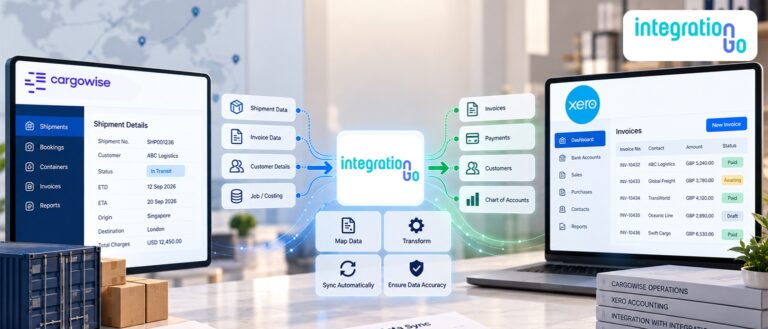
CargoWise and QuickBooks integration connects operational shipment data directly to financial records without manual intervention. CargoWise handles jobs, milestones, charge codes, vendor costs, and customer invoices. QuickBooks manages general ledger entries, accounts receivable, accounts payable, tax reporting, and financial statements.
When integration is implemented properly, invoices created in CargoWise flow automatically into QuickBooks. Vendor costs sync accurately, and the payments are reflected in both systems. Revenue and expenses align in real time.
Instead of exporting data and re-entering it manually, the systems communicate directly. That removes duplication, reduces reconciliation work, and keeps operational and financial records synchronized.
Understanding the Hidden Cost of Manual Accounting Workflows
Manual workflows may feel manageable at low volume, a few shipments per day, a couple of invoices, and some reconciliation at month-end. However, freight forwarding scales quickly, as shipment volume increases, manual accounting introduces delays and risk. Finance waits for confirmation from operations before billing, while operations waits for finance to confirm posting, and accruals are tracked in spreadsheets, and reports require adjustments.
The result is slower invoicing cycles, margin uncertainty, and month-end pressure.
Over time, these small inefficiencies compound. Growth adds complexity. More shipments mean more transactions, and more transactions mean more manual touchpoints, that’s where errors increase, and financial visibility begins to weaken.
The issue isn’t a lack of effort, it’s a lack of automation between systems.
What Changes When Accounting Workflows are Automated?
Automation shifts accounting from reactive to proactive, and when CargoWise and QuickBooks are connected, shipment activity automatically triggers financial updates. invoices post immediately, vendor bills align with job costing, and payment updates sync back into operational records.
Finance no longer needs to wait for manual reports, and operations no longer needs to confirm billing status separately. data flows once and remains consistent across both systems, which changes daily operations, teams focus on analysis instead of correction, and reconciliation becomes verification instead of investigation.
Key Benefits of Automating Accounting Workflows
When automation is implemented correctly, the advantages are both operational and financial:
- Faster invoice generation and improved order-to-cash cycles
- Reduced manual errors from rekeying charge codes and tax values
- Stronger margin tracking at the shipment level
- Cleaner month-end close with fewer adjustments
- Better audit trails with consistent transaction records
These benefits create financial stability that scales as shipment volume grows.
How Financial Visibility Improves Immediately?
Financial visibility isn’t just about dashboards. It’s about accuracy in real time. With integration in place, revenue and costs align as shipments progress. Leadership sees updated margin performance without waiting for reconciliation. Outstanding receivables are accurate. Vendor liabilities reflect real shipment costs.
This transparency supports smarter pricing decisions, better forecasting, and stronger cash flow management. Instead of reacting to surprises, leadership operates with confidence.
How Automation Increases Efficiency Across Teams?
Accounting automation doesn’t only help finance. It improves coordination across the organization.
Operations teams see billing status clearly. Customer service responds faster to invoice inquiries. Finance stops requesting manual shipment confirmations.
Here’s where efficiency shows up most clearly:
- Operations and finance work from the same data source
- Customer billing questions are resolved quickly
- Cross-team interruptions decrease significantly
That alignment strengthens overall performance, not just accounting accuracy.
How IntegrationGo Helps You Successfully Integrate CargoWise and QuickBooks?
Effective end-to-end integration requires more than technical connectivity. It requires understanding freight accounting structures, multi-branch configurations, tax handling, and charge code alignment.
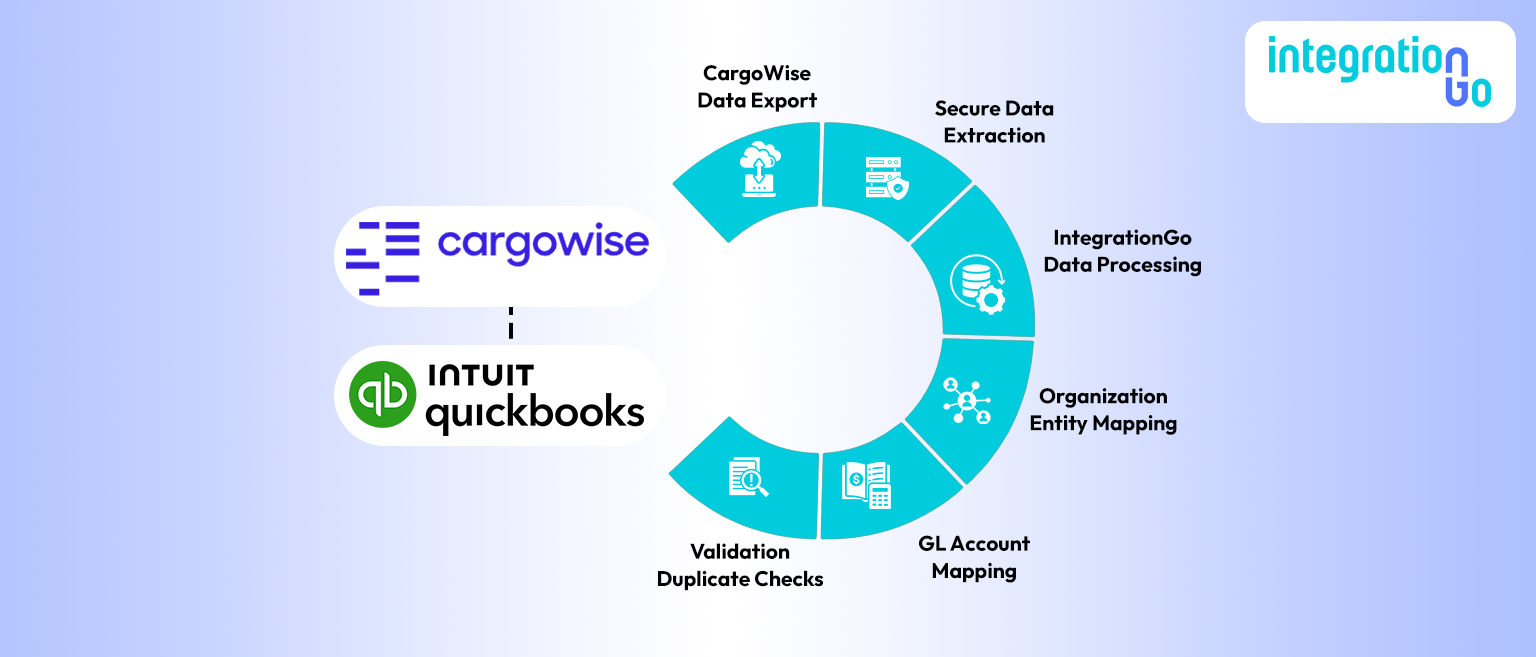
IntegrationGo connects CargoWise and QuickBooks through a structured workflow that ensures every shipment-related financial transaction moves accurately, securely, and automatically between systems.
CargoWise to QuickBooks Integration Workflow
1. CargoWise Transaction Source
Shipment activities in CargoWise generate invoices, supplier costs, and accruals. These transactions are captured with a complete operational and financial context.
2. Secure Data Export from CargoWise
CargoWise securely exports financial transactions through structured transfers. This ensures reliable and consistent delivery of accounting data.
3. IntegrationGo Middleware Processing
IntegrationGo middleware receives and interprets the CargoWise transaction data. It transforms the data into a format that QuickBooks can accurately process.
4. Organization Mapping & Entity Matching
The system identifies and matches customers, vendors, and branches with QuickBooks records. This ensures transactions are assigned to the correct financial entities.
5. GL/IR & Chart of Accounts Mapping
CargoWise charge codes are mapped to the appropriate QuickBooks Chart of Accounts. This ensures accurate classification of revenue and expenses.
6. Validation & Duplicate Checks
IntegrationGo validates each transaction before posting to QuickBooks. This prevents duplicate entries and ensures financial accuracy.
7. Shipment Reference & Audit Data Transfer
Shipment numbers and job references are included with each financial entry. This provides full traceability between CargoWise and QuickBooks.
8. AP & AR Document Creation
Supplier bills and customer invoices are automatically created in QuickBooks. This eliminates manual entry and improves accounting efficiency.
Conclusion
Accounting should support logistics growth, not slow it down. Automating accounting workflows through QuickBooks and CargoWise integration removes duplication, improves accuracy, and strengthens financial control. It creates a real-time connection between shipment execution and financial reporting.
- Data flows once.
- Visibility improves.
- Cash flow strengthens.
- Teams operate with clarity.
If your finance team is spending more time reconciling than analyzing, it may be time to integrate. Schedule a demo with IntegrationGo and see how automated CargoWise and QuickBooks integration can transform your logistics accounting into a scalable financial engine.