
A payable is created in CargoWise. Then another transaction follows. Before long, your finance team isn't just moving data between systems, they're checking accounts, matching organizations, watching for duplicates, and figuring out why a transaction didn't reach Xero.
This is where middleware can simplify the workflow.
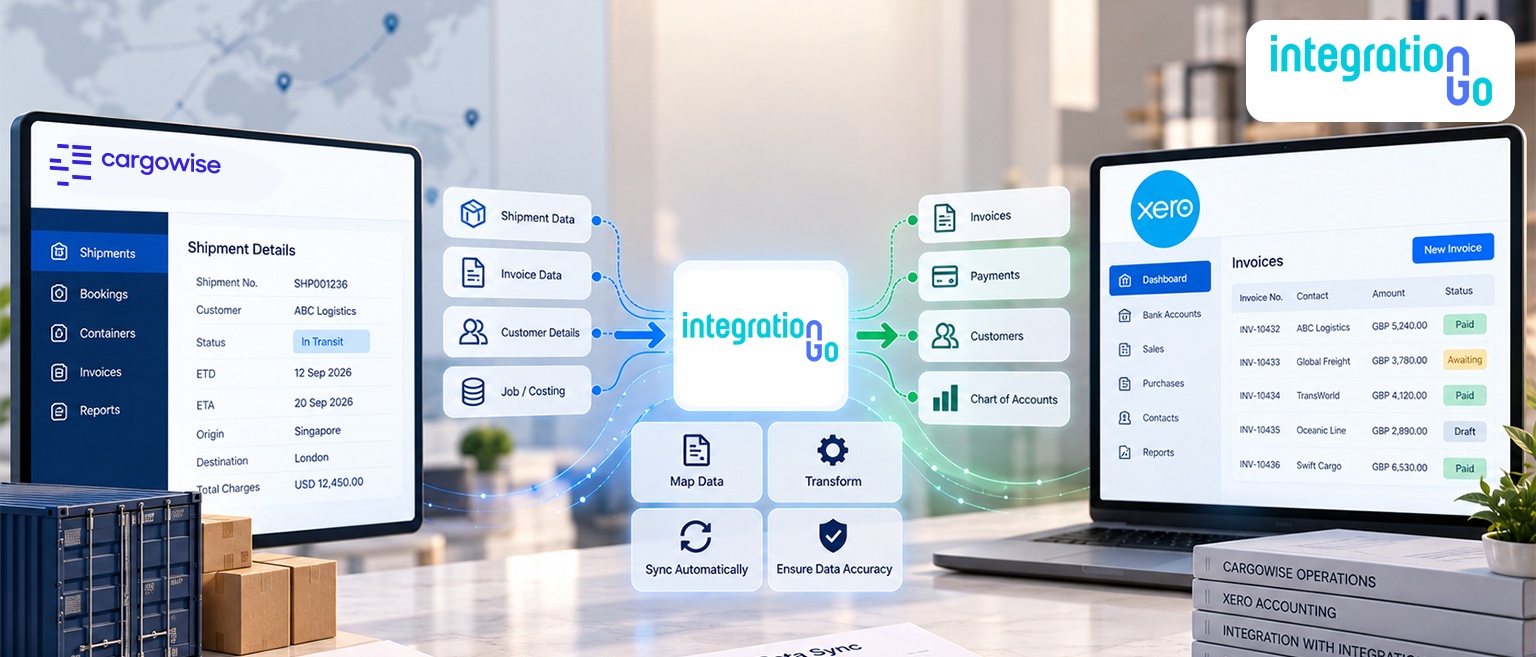
Instead of manually moving financial information from CargoWise into Xero, the middleware sits between the two systems and manages the data exchange. It receives CargoWise batch transactions, processes and validates the information, maps it to the required Xero structure, and sends it through the Xero API.
The result is a more structured way to move financial data while keeping validation, transaction status, and exception handling within the integration workflow.
What Financial Data can Move From CargoWise to Xero?
Before connecting the two systems, it’s important to understand what financial data needs to move from CargoWise to Xero.
CargoWise can generate several types of financial transactions that need to reach Xero, including:
- Payable transactions such as invoices, credit notes, journals, adjustments, and cost-related transfers
- Receivable transactions such as invoices, credit notes, journals, adjustments, and revenue-related transfers
- General Ledger transactions
- AP Payment details
- AR Receipt details
- ACR/WIP details
These transactions are compiled into batch transactions before being transmitted to the integration layer.
So, the workflow can cover much more than simply sending invoices from one system to another.
How does Middleware Convert CargoWise Batch Data Into Xero-Compatible API Calls?
Once CargoWise generates the financial transactions, they are compiled into batches and transmitted through FTP to the middleware.
This is where the integration layer starts processing the information.
The flow can be summarized as:
CargoWise → Batch Transactions → Data Processing → Mapping & Validation → Xero API → Xero
The middleware takes the incoming batch data and prepares it for Xero. It applies the required mappings and validation checks before converting the information into the appropriate format for the Xero API.
Once the data is ready, the integration makes the API call to Xero.
This removes the need for teams to manually transfer every financial transaction between the two systems.
How are CargoWise Organizations and GL Accounts Mapped to Xero?
Sending the right transaction isn't enough. It also needs to reach the right organization and account in Xero.
The integration can handle organization mapping and lookup to match organizations between CargoWise and Xero.
It can also perform GL account mapping and lookup to connect CargoWise accounts with the appropriate Chart of Accounts in Xero.
Before the transaction is sent, validation checks can confirm that the required organization and GL account exist in Xero.
This mapping step helps keep financial information aligned between the two systems and reduces the risk of sending transactions to the wrong accounting structure.
How are Duplicate Transactions, Errors, and Failed Requests Handled?
Automating financial data doesn't mean every transaction will always go through perfectly. The integration also needs to know how to deal with problems.
Duplicate validation can check whether a transaction has already been processed before it is sent to Xero. This helps prevent the same financial transaction from being processed more than once.
The workflow also handles the response from Xero. After processing a transaction, Xero sends a response indicating whether it was successful or failed.
This gives teams visibility into transactions that need attention instead of leaving failed requests unnoticed.
How can Branch-Level Invoice Consolidation and Approval Workflows Fit Between CargoWise and Xero?
For organizations managing invoices across multiple branches, financial processing may require additional review before transactions reach Xero.
Branch-level invoice consolidation can bring relevant invoice information together based on the required business rules.
An approval and dispute-management workflow can then give finance teams a place to review invoices, resolve disputes, and approve transactions before they continue through the accounting workflow.
This adds another level of control when transactions need human review before being processed in Xero.
How do Monitoring Dashboards Help Reconcile CargoWise and Xero Transactions?
Once transactions are moving automatically, teams still need a clear view of what happened to them.
Monitoring dashboards can help teams track transaction activity, identify successful and failed transactions, review exceptions, and understand which items may require further action.
This also supports reconciliation between CargoWise and Xero. Rather than manually checking both systems to determine whether transactions were processed, teams can use the monitoring layer to follow transaction status.
The integration flow is designed to support transaction-status monitoring, data accuracy, and improved financial oversight.
How can IntegrationGo Support the CargoWise to Xero Integration?
IntegrationGo can act as the middleware layer connecting CargoWise with Xero and managing the financial data flow between them.
The integration can support the key stages of the workflow, including:
- Receiving CargoWise batch transactions
- Transforming data for Xero
- Organization mapping and lookup
- GL account and Chart of Accounts mapping
- Organization and account validation
- Duplicate transaction validation
- Xero API calls and response handling
- Error handling and transaction tracking
- Branch-level invoice consolidation
- Approval and dispute-management workflows
- Monitoring and reconciliation
With these capabilities working together, the integration creates a controlled path for financial information to move from CargoWise to Xero without making finance teams responsible for every manual handoff.
How can a Connected CargoWise to Xero Workflow Improve Financial Operations?
A CargoWise to Xero integration is more than a simple connection between two systems. It creates a structured financial data flow where transactions can be generated in CargoWise, transmitted in batches, mapped to the correct Xero structure, validated, processed, and tracked.
By automating these steps, teams can reduce repetitive data handling, minimize duplicate processing, improve data consistency, and gain better visibility into transaction status and reconciliation.
The result is a connected workflow that lets finance teams spend less time moving and checking data and more time dealing with exceptions and decisions that actually need their attention.
Looking to automate your financial data flow between CargoWise and Xero? Contact us about building an end-to-end CargoWise Integration that connects your financial workflows with the mapping, validation, API processing, exception handling, and monitoring of your operations.