
Your team has booked a shipment, prepared the documents, and updated CargoWise. Now a third-party logistics (3PL) provider needs the shipment details to arrange transportation or delivery.
But what happens next? Someone may need to send an email, share a spreadsheet, confirm the details, and later check whether the shipment has been picked up or delivered.
When these steps happen across separate systems, even a routine shipment can create extra work for your team.
Integrating CargoWise with your 3PL providers helps information move between systems without relying on manual updates at every stage. The real value is not just transferring data. It is helping everyone involved work with consistent shipment information.
Why is Sharing Shipment Details With 3PL Providers Still so Manual?
CargoWise manages shipment information, while a 3PL provider may use its own system to manage transportation, warehousing, or delivery.
When these systems are not connected, your team often becomes the link between them.
For example, after creating a shipment in CargoWise, your team might email the pickup details to the 3PL provider. If the pickup time changes, someone must communicate the change. When the provider confirms delivery, the team may need to update CargoWise manually.
Multiply this process across shipments and providers, and routine coordination starts taking time away from other work.
An integration creates a more structured way to exchange agreed information between the systems, reducing the need for repeated data entry and manual follow-ups.
Follow a Shipment Through a Connected Workflow
Consider a freight forwarder arranging delivery through an external transportation provider. Here is how the information exchange could work.
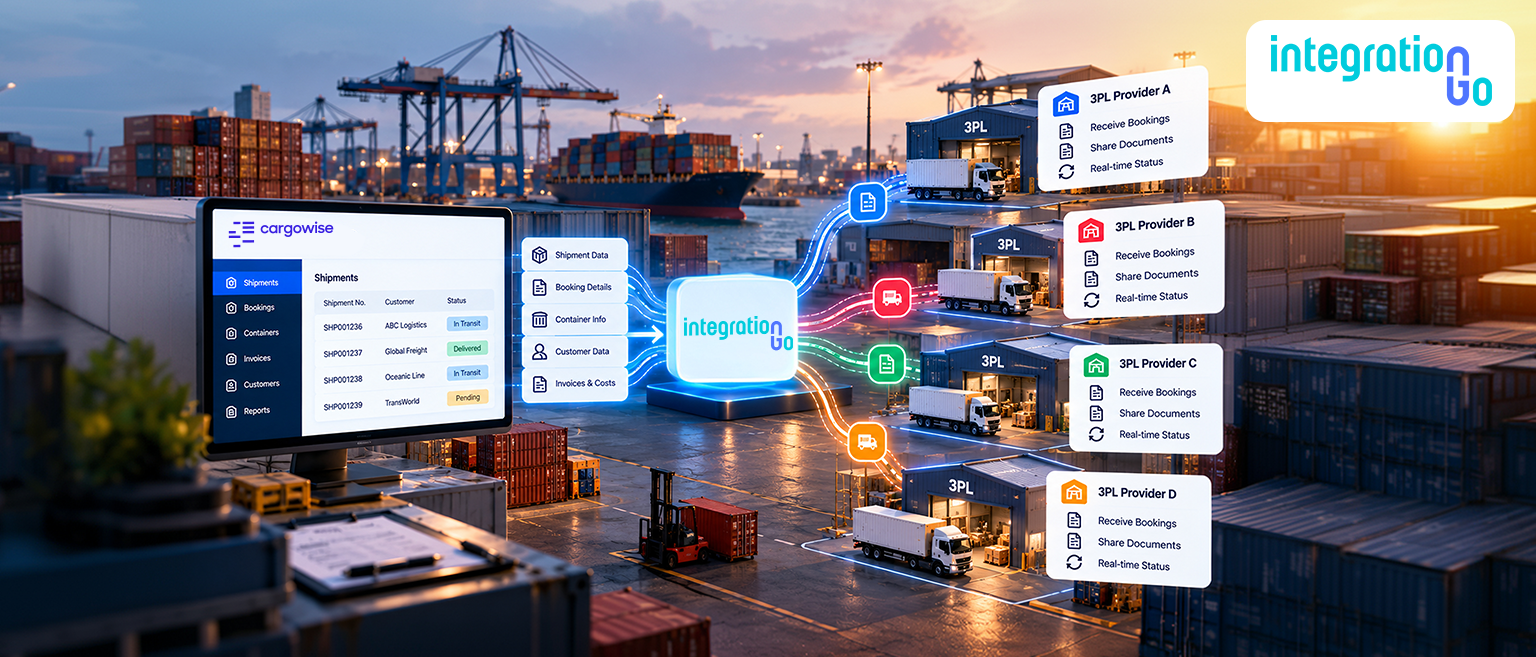
1. The shipment is created in CargoWise.
Your team enters the relevant shipment details, such as shipment references, pickup and delivery locations, and handling instructions.
2. The integration prepares the information.
IntegrationGo middleware receives information. data, checks required fields, and maps the information into the format expected by the 3PL system.
3. The 3PL provider receives the details.
The provider's system receives the information through a supported connection method. Its team can then use the available details to carry out the agreed transportation or delivery workflow.
4. Shipment updates come back.
If the provider's system makes status information available and the return workflow is configured, updates such as pickup confirmation, dispatch status, delivery confirmation, or exceptions can be sent back to CargoWise.
5. Your team works from updated records.
Instead of relying only on emails or manually collected updates, your team can refer to the information returned to CargoWise. The level of visibility depends on the data the provider shares and how frequently it is exchanged.
The important point is that the workflow can operate in both directions. Shipment instructions can move to the provider, and supported status updates can return to CargoWise.
Which Shipment Details should the Systems Share?
Not every 3PL connection needs to exchange the same information. The data should reflect the work the provider performs and what your team needs to know.
| Information | Why it matters? |
| Shipment references | Helps match the provider's records to the correct CargoWise shipment. |
| Pickup and delivery details | Gives the provider the locations and instructions needed to carry out the job. |
| Transport instructions | Communicates agreed handling requirements and other operational details. |
| Pickup or dispatch status | Helps your team understand where the shipment stands. |
| Delivery confirmation | Provides confirmation when the provider makes that information available. |
| Exception details | Helps your team identify issues such as a failed pickup or a delivery problem when supported. |
Before building the connection, agree on which fields are required, which system owns each piece of information, and which updates need to return to CargoWise. This avoids moving unnecessary data or creating conflicting records.
EDI or API: Which Connection Method Fits Your 3PL Workflow?
The right connection method depends on the systems used by your business and the 3PL provider.
EDI can exchange structured business documents and messages when both parties support the relevant formats and transactions. It may be suitable when a provider already uses established EDI processes.
APIs allow systems to exchange data through defined software interfaces. They may suit workflows that require more direct data requests or frequent status exchanges, provided the necessary API access and functions are available.
IntegrationGo middleware can help connect these different systems by mapping fields, transforming data, validating required information, and managing the exchange according to the agreed workflow.
Neither method is automatically the best choice for every provider. The decision should be based on available interfaces, supported messages, security requirements, and how quickly updates need to move.
What if a Shipment Update Fails or the Details do Not Match?
A connection is useful only when teams can identify problems in the data exchange.
For example, a shipment update may fail because a required reference is missing, a field uses a different format, or the receiving system rejects the information. Without suitable monitoring, your team may not know that the update never reached its destination.
A well-planned integration should define how these situations are handled. Depending on the connection, this may include validation checks, error logs, transaction monitoring, alerts, and a process for correcting and resubmitting failed messages.
It is also important to agree on who investigates an error and who is responsible for correcting the source data. This gives your team a clear process for resolving issues instead of repeatedly checking both systems.
How does IntegrationGo Connect CargoWise With 3PL Providers?
IntegrationGo acts as the middleware between CargoWise and the 3PL provider's system. It helps manage how information moves between the two environments.
Depending on the provider's technical capabilities and your operational requirements, the integration can be configured to support shipment data exchange, field mapping, validation, supported status updates, and error monitoring.
The starting point is your existing workflow: how shipment details are created, what information the provider needs, which updates it can return, and how your team handles exceptions. From there, the connection can be designed around the actual process rather than forcing your team to adapt to a generic workflow.
The goal is practical: reduce repeated data entry, make information easier to exchange, and help your team coordinate shipment handoffs with fewer manual steps.
Connect Your 3PL Partners to Your CargoWise Workflow
Working with 3PL providers does not have to mean managing a separate chain of emails and manual updates for every shipment. With the right integration, shipment instructions and supported status updates can move between CargoWise and provider systems through a defined workflow.
The key is to connect the right data, choose a suitable exchange method, and plan for errors before they disrupt operations.
Looking to connect your 3PL workflows with CargoWise? Contact us about an End to End CargoWise Integration tailored to your shipment processes and provider requirements.